Download Movie Blast APK for Android is an entertainment app that provides block buster movies and web series. The best thing it is totally free and easy to use with its simple interface and smooth running. Watch TV Shows, explore new series, learn about how to use, its features, compatibility, alternatives and FAQs.
MovieBlast APK

|
App information |
Details |
|
App name |
Movie Blast |
|
Version |
Latest Updated |
|
Developer/publisher |
Movie Blast Team |
|
APK file size |
20.4 & 82.3 MB |
|
Minimum Android version |
4.0 and + |
|
Release date |
Latest APK |
|
Pricing and advertisements |
Free |
|
Package name |
Android |
What is MovieBlast APK
MovieBlast APK is an Android installation file distributed under the Movie Blast name. APK is the package format Android uses to install applications. Downloading the file saves the installer to your device; installing it adds the application.
An APK download and a movie download are different things. The APK installs the app. Offline movie playback, where supported, requires a separate download from within the application. Before installing, check the publisher and package details rather than relying only on the name or icon. Files with similar branding can represent different releases or applications.

What Content Can You Find on MovieBlast?
Movie Blast is promoted around movies and episodic entertainment. The useful question is what your installed version actually makes available.
Movies: Check the title, year, language, and available playback options. Similar names, remakes, and dubbed editions can lead to different results.
TV shows and web series: Confirm the season and episode number before playback. A series listing does not necessarily contain every episode.
Telugu and other regional-language content: Check audio and subtitle options individually. Regional labels may describe a film’s original language rather than every available track.
Other categories: Animation, documentaries, live television, sports, and music should only be listed as supported features after checking the actual application.
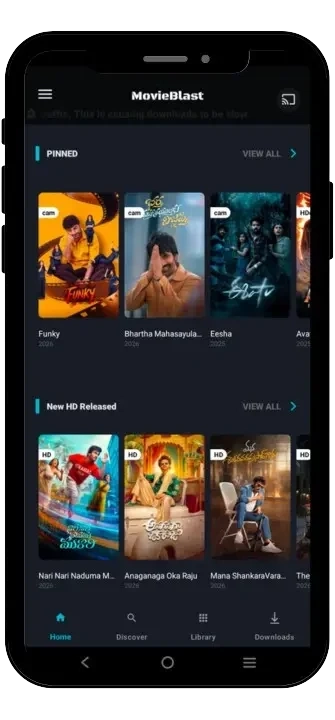
Why is Movie Blast Best APK ?
Movie Blast entertainment discovery
is the best option when you are going to watch non stop live streaming. MovieBlast is the best app which gives users recent movies and shows at time. A user can install this app at android devices. This application is supportive to low category android devices. A user can see live streams or can download from it. MovieBlast is considered a popular choice by many users because it offers a simple and convenient way to discover and watch movies and TV shows in one place. Its user-friendly interface makes it easy to browse categories, search for titles, and find new entertainment without a complicated setup.
Multiple Content
MovieBlast may also provide a wide selection of content, multiple streaming options, and useful features that make browsing more convenient. For users looking for an easy-to-use entertainment app, its straightforward design and broad content selection can make it an appealing option. However, availability and content rights can vary by region, so users should make sure they use legitimate sources and only access content they are authorized to watch.
Main Features of Movie Blast App
MovieBlast download pages advertise several entertainment features. The following explains what those features mean and what to check in your installed version.
Movie and TV Show Library
A useful entertainment library helps you find a title without searching through unrelated listings. Check whether the app separates movies from series and provides details such as release year, language, synopsis, and episode information.
A visible title listing does not necessarily mean a working playback source is available. Availability can change, so check the title’s details before planning to watch it.
Search, Categories, and Filters
Search is useful when you already know a movie or series name. If the results are unclear, try the full title and compare the release year.
Categories help when you want to browse instead. Available filters may organise titles by genre, language, year, or other details. Use the options actually present in your release rather than expecting every filter described on another download website.
Video Quality and Streaming Options
When a title offers multiple quality settings, select an option that suits your connection and screen. Higher resolution generally requires more data, while a lower setting may be more practical on a limited mobile plan.
Playback also depends on the source, device, and connection. A high-resolution label does not guarantee uninterrupted viewing. If multiple sources are available, check whether another source resolves a playback problem.
Downloads for Offline Viewing
Offline downloads can be useful when you will have limited internet access. If your MovieBlast version includes this function, check which titles support it and where the downloaded content is stored.
Some applications keep downloads inside their own player rather than saving an ordinary video file. Confirm playback before travelling instead of assuming that a completed download will open in any video player.
Audio Languages and Subtitles
Audio tracks and subtitles are separate options. A Telugu title may not include Hindi audio, and an English description does not establish that English subtitles are available.
Open the title or player settings to inspect the available options. If subtitle controls are present, check the language and timing. External subtitle files and appearance settings should only be expected where the installed player supports them.
Player Controls, Favourites, and Viewing Progress
Look for the playback controls you regularly use, such as seeking, volume, screen orientation, or playback speed.
If favourites or watchlists are available, they can help you return to titles later. Resume playback may depend on local app data or an account. Check how progress is saved before clearing data, changing devices, or reinstalling.
Requirements to Check Before Downloading
Make sure your device meets the Android requirement shown in the app-information table.
You also need enough free space for installation and any additional data the app stores. The APK’s download size is not necessarily the total storage the installed application will use.
Before continuing, check:
- Your Android version.
- Available device storage.
- The file’s publisher and package information.
- Any documented hardware or architecture requirements.
- The permissions requested during installation or first use.
Avoid relying on generic statements that an APK works on every Android phone.
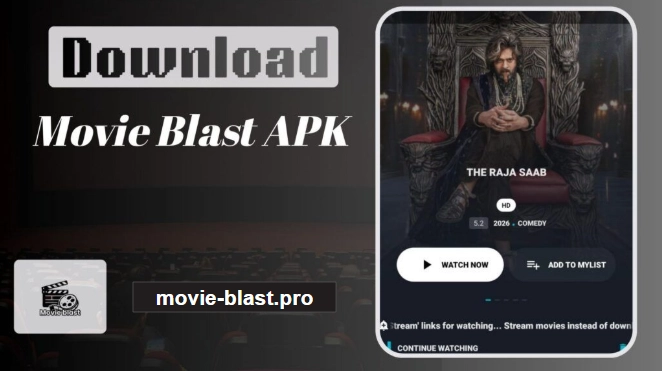
How to Download and Install Movie Blast APK on Android
1. Review the Download Details
Open the MovieBlast https://movie-blast.pro/download/ download page and compare the listed version and requirements with your device.
Make sure you understand which file the download button provides. If the file name, publisher, or destination is unexpected, check it before proceeding.
2. Download the APK
Save the installation file and wait for the download to finish. You can usually locate it through your browser’s downloads list or your device’s file manager.
Do not attempt to install an incomplete file.
3. Review Android’s Installation Prompt
When you open an APK downloaded outside Google Play, Android may require permission for the browser or file manager to install applications. The exact settings and restrictions vary by device and Android version.
Only proceed with a source you have checked. Keep Play Protect enabled and read any security warning instead of dismissing it automatically.
4. Complete Installation
Follow the installer’s prompts. If Android reports an error, note the exact message and check compatibility, available storage, and the downloaded file.
Once installation finishes, open the app from the installation screen or your application list.
5. Review Permissions
Read permission requests before granting access. Consider whether each request is needed for the function you are using.
After installation, you can review the app’s permissions in Android settings and remove installation permission from the browser or file manager if it is no longer needed.
How to Use MovieBlast
Start by exploring the home screen and available menus. Search for a specific title or browse a category that interests you.
Open a result and check its details before selecting playback. For a series, confirm the season and episode. For a movie, compare the release year and language to avoid choosing a different edition.
Once playback starts, inspect the available quality, audio, and subtitle controls. Change one setting at a time if something is not working as expected.
If the app offers favourites, use them to save titles for later. Where login is available, check which functions require it. Browsing without an account does not necessarily mean saved history will transfer between devices.
MovieBlast apk Pros and Cons
Pros
Cons
How to Download Movies for Offline Viewing
If the installed release supports content downloads, the general process is:
- Open an eligible title.
- Find its download option.
- Choose from the available quality or language settings.
- Check that sufficient storage is available.
- Wait until the app confirms completion.
- Open the downloaded item from the app’s downloads area.
Before relying on offline playback, test the saved item without an internet connection. Check whether it opens correctly and whether audio and subtitles are included.
Delete unwanted downloads through the application where possible. Be aware that clearing app data or uninstalling may remove saved content.
MovieBlast Device Compatibility
MovieBlast for PC and Windows
An Android APK is not a native Windows installer. Running it on a computer would require a compatible Android environment, and successful installation does not guarantee that playback will work.
Before following an emulator guide, check the emulator’s requirements and whether the specific MovieBlast release has been tested with it.
PC test status: [Insert tested setup and results, or state that compatibility is unverified.]
MovieBlast for Android TV and Other Smart TVs
Smart TVs use different operating systems. An Android package should not be assumed to work on every television.
Even when installation succeeds, the interface may require touch input or have controls that do not work well with a remote.
TV test status: [Insert confirmed devices, operating systems, and limitations.]
MovieBlast on Firestick
Firestick compatibility needs separate testing. Confirm installation, remote navigation, and playback before describing a release as supported.
Firestick test status: [Insert verified result.]
Is MovieBlast Available for iOS?
The Android APK supplied on this page is not an iPhone or iPad installer.
We have not established a verified iOS release for this draft. An iOS download should only be linked after checking the application’s publisher and genuine distribution source.
Can You Watch MovieBlast Online Without Installing the App?
A website containing MovieBlast information or download buttons is not automatically a browser-based streaming service.
Browser playback and streaming inside an Android app are different ways of accessing content. A download button installs software; it does not establish that a web player exists.
Browser-access status: [Confirm whether a genuine MovieBlast web player exists and identify it, or clearly state that browser playback is not offered.]
How to Update MovieBlast
First, check your installed version against the release listed on the download page. Read the changes and compatibility information before updating.
Use the established publisher’s update method or an identified replacement package from the same source. A similarly named file from another publisher may not be a compatible update.
Before making changes, check whether the app provides a way to preserve saved information. Avoid uninstalling immediately when an update fails, because doing so may remove settings and downloaded content.
If Android reports a package or signature conflict, verify the file’s identity rather than repeatedly trying unrelated downloads.
MovieBlast File Information and Permissions
An app name, logo, or security badge does not establish the identity of an APK. Useful download information includes the publisher, package name, version, and file checksum.
A scan result describes a particular file at a particular time. It should not be presented as a permanent guarantee.
Similarly, an application that does not require login may still process device or usage information. Read the relevant privacy information and review permissions rather than assuming that account-free access means no data collection.
Common MovieBlast Problems and Troubleshooting
APK Not Installing
Check the Android requirement, free storage, and whether the download completed. If the error concerns an existing package, compare the publisher and version before attempting another installation.
App Not Opening or Stuck Loading
Close and reopen the app, then check the connection and restart the device if necessary. Record any error message.
Clearing cache may help some temporary problems, but clearing app data is a different action and can remove saved information.
Buffering or Playback Not Starting
Check whether the problem affects one title or everything you try. A single unavailable source requires a different response from a device-wide connection problem.
If available, try a lower quality setting or another source. Reinstalling the entire application is not always necessary.
Downloads or Subtitles Not Working
For downloads, check storage, connection stability, and any error shown by the app.
For subtitles, confirm that the selected title actually provides the requested language. If timing controls are available, adjust them; otherwise, another subtitle track may be needed.
When reporting a problem, include your app version, device model, Android version, and the exact error. Do not share passwords or other sensitive account information.
MovieBlast Alternatives: What to Compare
If MovieBlast does not meet your needs, compare alternatives by the features that matter to you.
Check whether a service supports your device, carries the titles you want in your region, provides your preferred language, and offers offline viewing. Also compare subscription costs, advertisements, and customer support.
Choose identifiable publishers and clear distribution sources. A long list of advertised features is less useful than knowing that the service works on your device and offers the content you need.
FAQs
Conclusion
Finding the right information about Movie Blast APK starts with understanding the app, checking its compatibility, and choosing a trustworthy download source. At Movie-Blast.pro, our goal is to help visitors explore available app information, understand the installation process, and find practical answers to common questions.
Before installing Movie Blast, verify the APK version, review the required permissions, and make sure the application is compatible with your Android device. You can also use our installation guidance and troubleshooting tips to better understand common download and setup issues.
Explore Movie Blast app information, learn how APK installation works, and make informed decisions before downloading. Always use authorized sources and verify app details to enjoy a safer, more informed experience.